

TL;DR
- Start monitoring listings 48 hours out, intensify checks 6–12 hours pre-show, and be ready to buy 60–90 minutes before doors for the best balance of price and supply.
- Combine two trusted resale platforms, an at-venue box office check, and a local fan group to increase same-day success.
- Use the 3-step verification checklist: confirm seller name & order ID, check platform guarantee, confirm transfer method and screenshot.
- Follow the 30–90 minute playbook below and use the same day ticket buying checklist to avoid scams.

Introduction
This guide shows exactly how to find verified same day tickets summer 2026 for festivals, stadium shows, and big nights out. You’ll get practical, platform-specific steps you can use when you’re building tools, running alerts, or simply trying to score entry at the last minute. The focus is actionable: which channels to watch, exact alert filters to set, and a 30–90 minute playbook you can execute on show day. For more on this, see Summer 2026 city scene.
The mindset — timing, flexibility, and price expectations for Summer 2026
If you want verified same-day tickets summer 2026, accept three realities up front: timing matters, flexibility pays, and prices move quickly. That shapes how you set alerts, where you search, and what price you’re willing to accept.
Timing: start monitoring listings 48 hours before the event. Many sellers list early but hold off on lowering prices until closer to doors. Local fan communities and resale platforms often show increased volume 6–12 hours pre-show, and a meaningful chunk of good deals land in the 60–90 minute window before doors.
Flexibility: be open to nearby sections, split pairs, or slightly later arrival. For example, if you had your heart set on floor center for a headline show, you’ll see more verified transfers for side floor or lower bowl in the last hour. If you’re building features for users, offer auto-alerts for “nearest available” seats and price bands rather than exact-row matches.
Price expectations: prices usually decline as the event approaches, but supply and demand create volatile swings. Expect some sellers to hold firm until the last minute; others will drop quickly within an hour. Set a price threshold rule: if you normally pay $120, be ready to grab seats at $140 within 90 minutes (convenience premium) or wait for $100–$110 if you can risk it.
Example scenario: a midsize stadium show listed at $150 face value. Two days out, resale averages $220. Six hours out, it drifts to $160 as sellers look to sell. Within 90 minutes, you see verified transfers at $110–$140. If you want a verified transfer tied to your name, aim for the $130–$150 zone and confirm transfer method in the purchase flow.
Quotable definition: "Verified transfer = a ticket transfer completed via the venue/platform that includes buyer identity link and scannable QR tied to the buyer."
Start monitoring 48 hours out, escalate checks 6–12 hours pre-show, and buy 60–90 minutes before doors for the best balance of price and supply.
Tools of the trade — apps, alerts, and in-venue channels to monitor
To find verified same-day tickets summer 2026, you need a toolkit that covers official channels, reputable resale platforms, and local community sources. Each tool plays a role: broad availability checks, verified-transfer listings, and last-minute local inventory.
- Official box office: call or visit on the day of the show. Many venues hold a small window of returns or release held-back seats the morning of the event.
- Resale platforms with verified transfers: use platforms that show transfer method and verification badges. When building alerts or comparing offers, prefer listings that state "verified transfer" or show the transfer provider (platform-to-platform transfers are safer).
- Local fan groups: Facebook, Discord, and city-specific forums often have last-minute posts; these are fast but require careful vetting using the verification checklist below.
- Mobile ticket apps: monitor the venue’s official mobile app for release windows and verified transfer options; some apps show instant inventory or integrated resale.
Practical example for a user flow: your site aggregates listings from two trusted resale platforms and displays a "verified transfer" badge when the listing metadata includes buyer identity link and venue-compatible QR transfer. If you’re a developer, normalize the transfer fields so your alert engine can filter strictly for verified transfers.
When you compare tools, track three fields: transfer type (wallet transfer, venue transfer, PDF), guarantee presence (platform refund policy), and verify artifact (order ID or seller name). These let your system mark an offer as verified for users and reduce support friction on event day.
Combine two trusted resale platforms, an at-venue box-office check, and a local fan group to increase same-day success.
Best alert setups (which apps to use and what keywords/filters to set)
Use at least two alert sources: one aggregator or resale app and one local channel. Example apps to monitor include resale marketplaces that expose transfer metadata and general marketplace apps that let you filter by "electronic transfer" or "mobile transfer." Set alerts for combinations of keywords and filters so you catch listings that vendors call "verified transfer" or "venue transfer." Suggested filters:
- Event name + "transfer" or "verified transfer"
- Price cap + section preferences (e.g., "under $160, lower bowl")
- Delivery method: "mobile transfer" or "venue transfer"
- Time window: set alerts for 48h, 12h, 3h, and 90 minutes before doors
Make shorthand alert names like "Event — verified transfer — $150 cap" so you can toggle fast on show day. If your product supports webhooks, push critical alerts into a lightweight chat channel so a human can act quickly.
Venue-specific tactics (box-office windows, verified resale portals, social media seller checks)
Know the venue’s rules and release habits. Many venues run a morning release or hold a switch-over window an hour before doors when held seats and artist allotments are reconciled. Box offices sometimes release returns an hour before doors; if you’re local, plan a rapid trip or have a buddy check in-person.
Use venue-verified resale portals when available: these listings typically integrate directly with the venue’s scanning system and offer an easier transfer path. If a listing shows a venue transfer option, it often means the QR will be tied to the buyer’s name at check-in.
On social channels, verify seller identity: look for public post history, event attendance photos, consistent account age, and mutual group membership. Always request the order ID and a screenshot of the platform confirmation before committing; treat social posts as leads, not proof of authenticity.
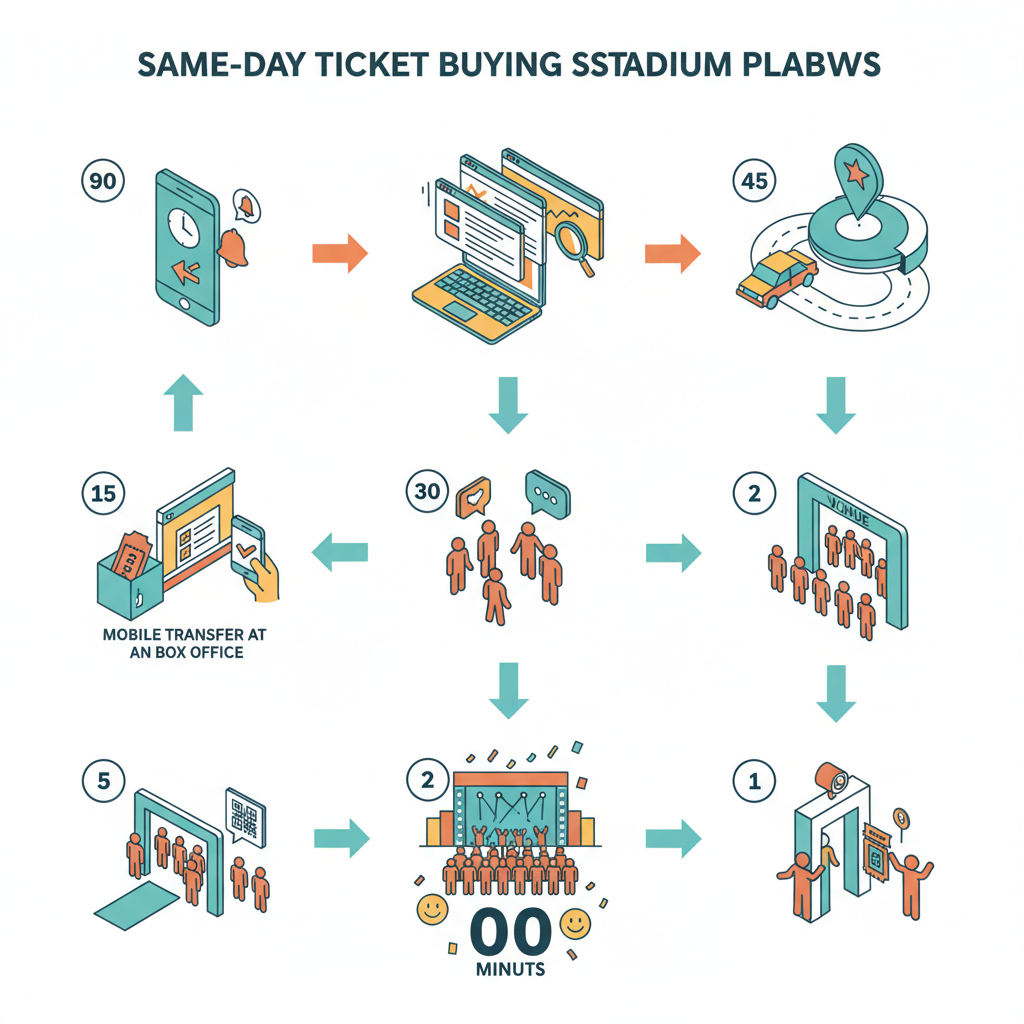
Step-by-step 30–90 minute same-day buying playbook
When you have 30–90 minutes to buy, run the playbook below. It balances speed and safety so you don’t overpay or accept non-verified tickets.
Preparation (30–90 minutes out): open two resale apps, the venue app, and a local chat or Facebook group. Confirm that your payment method is ready and that your mobile wallet is set up for immediate transfer. If you use a delivery address for mobile transfer, have the exact name you’ll use at the door.
- 60–90 minutes out: scan both resale apps for verified transfers under your price cap. Use keyword filters from the alert setup to sort by "verified transfer" and delivery method.
- 45 minutes out: call the box office to ask if any returns or artist allotments will release within the hour. Note exact pickup or transfer instructions.
- 30 minutes out: post a short message in the local fan group offering your price and preferred section; include rapid contact instructions and request seller order ID immediately.
- 15 minutes out: accept the best verified transfer. Confirm seller name, order ID, and transfer method. Insist on a platform transfer where possible; if the seller proposes QR image or PDF, apply extra verification steps in the checklist.
- Final 10 minutes: double-check the transfer has arrived and the buyer name matches. If the venue requires ID matching, ensure the transfer is tied to your name or that you and the seller will coordinate at box office per venue rules.
Concrete thresholds: set a personal maximum price and stick to it. For example, set a 25% max over face value for stadium shows and 40% for sold-out festival days where demand spikes. If your app uses dynamic rules, flag sellers who won’t accept immediate platform transfer as higher risk.
Pre-event (1–24 hours): monitoring, watchlists, and price thresholds
Between 24 and 1 hour out, intensify monitoring cadence and refine price thresholds. Add the event to a watchlist on both resale apps, enable notifications for "price drop" and "new listing," and set a sliding price threshold that lowers as time decreases (for example: 24h cap $220, 6h cap $180, 90m cap $150).
Practical watchlist actions: follow specific sellers who repeatedly list verified transfers, and mark their listings. Use the event’s page on discovery platforms to compare average listing prices and spot anomalies. If you run a site, show a price histogram that updates in real time so users know whether a listing is priced above or below the current market median.
2 hours before show: negotiation template, timing to buy, and where to search locally
Two hours out is a negotiation window. Use this template when messaging sellers: "I can do $X now and need verified transfer via [platform]. Please send order ID and screenshot; I’ll pay immediately on verification." Keep messages short and include a strict time limit to increase urgency.
Where to search locally: refresh the resale apps, check the venue’s official box office feed, and watch local groups. If you plan to try box office in person, aim to arrive 60–90 minutes before doors to catch any releases. For developers, present a "nearby pickup" filter so users see sellers likely to meet in-person or perform quick transfers.
At-event strategies: box-office queues, pickup protocols, and mobile transfer verification
If you end up picking up at the venue, follow the venue’s pickup protocols exactly. Ask the box office what they accept for transfers: some venues convert a transfer into a new ticket in your name if you supply the order ID and ID matching. Others only accept platform-issued verified transfers.
When a mobile transfer arrives, verify the QR is scannable inside your wallet and that the buyer name matches your ID if required. Never accept a cropped screenshot as the sole proof of purchase; insist on a platform transfer or an order ID you can confirm through the selling platform.
Use the 3-step verification checklist before transferring money: confirm seller name and order ID; check platform guarantee; confirm transfer method and screenshot.
Avoiding scams — verification checklist and red flags to stop and walk away
Scams spike around popular shows. Use a short verification checklist every time and walk away if a seller fails any item.
- Confirm seller name and order ID: request the seller’s platform username and the order ID shown on their confirmation page.
- Check the platform guarantee: confirm that the listing is covered by the resale platform’s buyer guarantee or that the venue accepts platform transfers.
- Confirm transfer method and screenshot: require a confirmed platform transfer screenshot or an active transfer pending in your account before you pay.
Red flags that mean stop and walk away:
- Seller refuses to provide an order ID or screenshot of the platform confirmation.
- Seller asks for non-refundable payment methods (wire transfer, crypto) without a platform escrow.
- Listing photos show blurry or obviously edited QR codes.
- Seller claims "I’ll meet you at the door" but can’t produce platform transfer evidence.
Example: a seller on a local group offers two lower-bowl seats and asks for a Venmo prepay. They provide a photo of a ticket stub and a phone number. Ask for the order ID and a screenshot of the active transfer in the resale app; if they can’t provide it, decline.
When to use resale vs. box office vs. last-minute listings on TourInfo (decision flowchart)
Use resale, box office, or last-minute local listings depending on your risk tolerance and timing. TourInfo helps compare offers and displays metadata you can use to decide quickly. Below is a simple decision flow you can use.
| Situation | Best option | Why |
|---|---|---|
| More than 48 hours before show | Resale marketplace + watchlists | Largest supply and best chance to find verified transfers at fair prices |
| 6–48 hours before show | Combined resale + venue app checks | Prices start to move; venue releases and verified transfers appear |
| Within 90 minutes | Box office visit or verified platform transfer | High chance of last-minute release or rapid accepting sellers; lower fraud risk with platform transfers |
| When face value available | Box office / official channels | Always take face value via official channels when available to avoid risk |
Decision rule you can implement: if TourInfo shows two or more verified-transfer listings under your price cap, prefer a platform-verified transfer; otherwise, check box office availability if time allows. If building a decision UI, show the top three signals: transfer type, guarantee present, and seller verification age.
Quick scripts & templates for buyers (what to ask a seller, what to screenshot, refund request wording)
Use short, copy-paste-ready scripts to speed verification and reduce mistakes. Paste these into your messaging app when you contact sellers.
What to ask a seller (initial message)
- "I’m ready to buy now for $[X]. Will you transfer via [platform]? Please send your seller username and order ID so I can confirm before I pay."
What to request as proof (before paying)
- Order ID from the resale platform screenshot (include timestamp)
- Screenshot showing "transfer pending" or the platform confirmation page
- If meeting at venue, ask for the transfer confirmation that the venue accepts
Refund request wording (if transfer fails)
- "Transfer failed upon scanning; please refund immediately via the payment method used. Order ID: [ID]."
- "I will open a claim with the resale platform and my payment provider if this is not refunded in 24 hours."
Include a short folder of example screenshots your users can compare to known-good artifacts; that saves time verifying. If your platform supports uploads, allow buyers to attach the seller screenshot for audit trails.
CTA & next steps — submit a tip, check live listings, and join the weekly update for the cluster
Now that you’ve seen the playbook, use the same day ticket buying checklist below before your next purchase. If you track events on TourInfo, add the event to your watchlist and enable "verified transfer" alerts so you don’t miss last-minute releases. Submit tips about venue release windows or local seller behavior to your fan community so others benefit.
Same day ticket buying checklist
- Set alerts 48h out and add event to watchlists on two platforms
- Confirm payment method and mobile wallet are ready
- Have seller order ID and platform screenshot before paying
- Insist on platform-verified transfer or venue transfer when possible
- Apply your personal price cap and stick to it
Join a weekly update or local cluster digest to get tips on release windows and seller patterns for festivals and stadium runs. If you see a pattern — for example, a particular venue releases extra seats at 10:30 AM — share that in the group so others can act faster.
FAQ
What does it mean to score verified same?
Scoring "verified same" means acquiring a ticket the same day of the event where the transfer is completed through a venue or resale platform that ties the scannable QR to the buyer and includes buyer identity linkage, providing a verifiable transfer.
How do you score verified same?
You score verified same by combining early monitoring (start 48 hours out), focused alerts and filters, using resale platforms that show verified-transfer metadata, checking the venue box office close to doors, and applying the 3-step verification checklist before payment.