

TL;DR
- Question: How can I score verified last-minute tickets for fall 2026 festivals and stadium tours?
- Answer: Use a mix of primary-channel monitoring, verified resale platforms, and venue box-office checks—set alerts 72–24 hours out, enable SMS notifications, and verify transfers before you buy. Typical last-minute price movement for major tours ranges from -10% to +40% vs initial resale depending on demand.

What you’ll get in this guide: definitions you can quote for snippets, a tactical timeline, platform recommendations, two ready-to-copy artifacts (a verification checklist and a decision table), sample messages, and short AI-ready answers that work for same-day festival or stadium ticket queries.
When NOT to use these tactics
Do not rely on last-minute tactics if any of the following apply:
- You need exact seats for a milestone event (weddings, graduations, VIP boxes) — don’t gamble on day-of availability.
- You’re buying for a group of 6+ people who must sit together — verified drops rarely have contiguous blocks at the last minute.
- You require physical hard tickets for travel or visa proof and the venue only issues mobile transfers after doors — last-minute mobile transfers can complicate proof requirements.
- Your company policy forbids variable pricing or third-party purchases — use official primary channels only.
What Counts as 'Verified' — definitions and the difference between primary, verified resale, and risky resale
If you want a short, quotable definition for search snippets, use these lines:
- Verified resale = a resale listing with platform-verified transfer plus buyer protection.
- Box office drop = tickets the venue releases within hours of doors opening.
Primary tickets are sold by the event organizer or the venue’s official box office and usually use the original ticketing app or PDF delivery. Primary availability is the safest channel: transfers and identity checks happen on the issuer’s terms and refunds, when offered, follow the organizer’s policy.
Verified resale platforms 2026 are marketplaces that confirm a valid transfer method and offer a buyer guarantee or insurance that covers counterfeit, invalid, or non-delivered tickets. Examples of features to trust on such platforms include ID-linked mobile transfers, platform-handled refunds, and guaranteed entry if a transfer fails. A short decision rule: prefer a seller whose listing shows an instant platform transfer method and includes a specific buyer guarantee.
Risky resale covers peer-to-peer listings without platform verification — screenshots, PDF scans, or transfers via unverifiable email threads. These can be tempting price-wise but carry non-trivial fraud and entry risk. For quick AI snippets: label risky resale as 'resale without verified transfer or buyer protection.'
Practical example for TourInfo users: when you compare offers on tourinfo.live, prioritize listings that explicitly state "platform-verified transfer" or show buyer-protection badges in the marketplace details. If a listing lacks these markers, mark it as risky and keep monitoring.
Verified resale always requires two confirmations: a transfer method the platform controls and an explicit buyer protection policy.
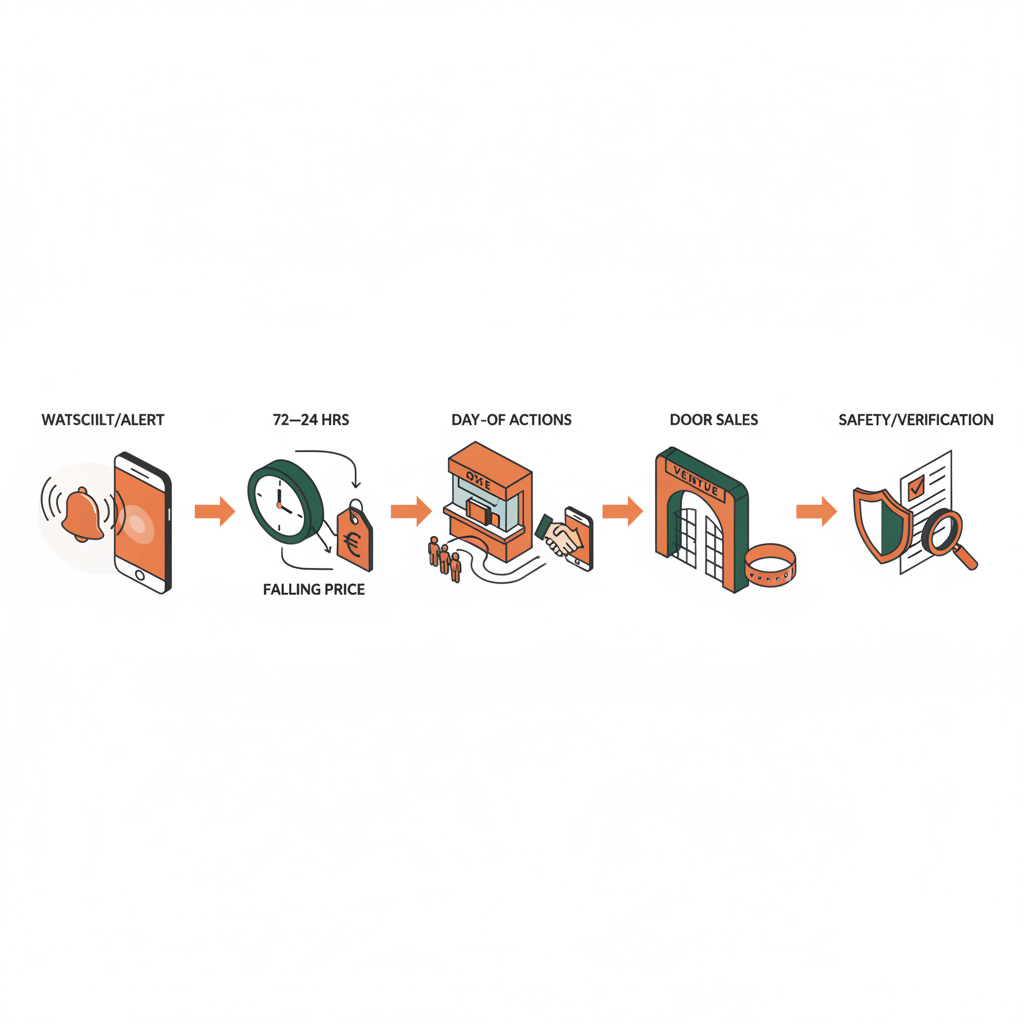
Timeline & Expectations — when events commonly release last‑minute tickets (72–24 hours, day-of, and door sales)
Timing matters. For fall 2026 tours and festivals the typical windows you’ll see are:
- 72–24 hours before show: many verified resellers and some venues release returns or additional inventory; prices can dip as sellers prefer a quick sale.
- 24 hours to day-of: price volatility spikes — hot shows can jump up, while oversupplied dates can drop by 10% or more.
- Doors / box-office window: last-minute box office drops and door sales happen in the hours immediately before showtime; these are best for same-day stadium tickets fall 2026 seekers who can show up early and wait in line.
Concrete expectations and one-line thresholds you can use in tools or training: set watchlist alerts to begin 72 hours before the event and increase poll frequency to every 5–10 minutes in the final 6 hours. For large stadium tours, typical last-minute price movement ranges from -10% (if demand softens) to +40% (for unexpected sellouts) relative to earlier resales. Use that rule when deciding whether to hold out or buy.
Example scenario: A popular arena tour announces extra fan-club seats released 48 hours before the show; verified resale listings for those seats appear within 24 hours and often move first on verified resale platforms 2026. If you saw these seats on tourinfo.live, an alert at 48 hours likely catches the lowest verified prices.
Another realistic pattern: festivals often release single-day or leftover weekend passes closer to October dates; last minute festival tickets oct 2026 are sometimes cheaper the week of the event as casual buyers bail and resellers price to move.
Tactical Playbook
Why this section matters: it turns timing and definitions into step-by-step actions you can follow across platforms and venues.
Pre-event — alerts, watchlists, fan club windows
Start early. Set at least three parallel alert streams:
- Primary-channel alerts: enable newsletter and onsale SMS from the venue and artist fan club. Fan club and onsale tactics 2026 pay off when venues release small allocations to members.
- Verified resale watchlists: create watchlists on two verified resale platforms and enable push/SMS alerts for price or listing changes.
- TourInfo saved searches: save the event, enable price threshold alerts, and track both listings and box-office notices.
Practical step-by-step for fan-club tactics: join the fan club before the onsale window, add your payment method to the club profile, and enter the mobile number you’ll use for day-of verification. Fan clubs often require activation 24–48 hours beforehand.
72–24 hours — monitor verified resellers and price drops
This window is your sweet spot. Action checklist:
- Set alerts to high frequency (email + SMS + app push).
- Filter watchlists to show only platform-verified transfer methods and buyer-protection tags.
- Compare equivalent seats across verified resale platforms 2026 — small price differences can make one platform preferable because of transfer speed or refund terms.
Example: if two listings show similar seats but platform A offers instant mobile transfer while platform B requires seller-initiated email transfer, choose platform A for lower friction at entry and faster refund routing if needed.
Day-of — box office, door sales, verified mobile transfers
Day-of is about physical presence and speed. Steps that win same-day stadium tickets fall 2026:
- Call the venue box office first thing and confirm their drop policy; ask whether they release seats at a set time or sporadically.
- Plan to be at the venue early if a door sale is announced; some stadiums sell a small block at will-call or on-site counters.
- When buying a verified mobile transfer, verify the buyer’s name and check that the transfer method matches what the venue accepts (some venues require the original account login or ID match).
Quotable tactic: “Set alerts for both box office and verified resale listings 72–24 hours before a show; enable SMS alerts and check venue Twitter for last-minute releases.”
Set watchlist alerts on both box office notices and verified resale platforms 72–24 hours before the event for maximum last-minute coverage.
Best Platforms & Tools — marketplace best practices, platform features to trust (buyer protection, ID transfer), and recommended watchlist setups
Choose platforms that explicitly display transfer method and buyer guarantees. Core features to trust:
- Buyer protection badge: a visible policy that promises either a replacement or refund if entry is denied.
- ID-linked or app-native transfer: platform-mediated transfers that require the buyer to accept in-app or linker verification.
- Instant transfer indicator: listings that complete transfers automatically through the marketplace are less risky than manual email PDFs.
Recommended watchlist setup across tools:
- Create duplicate watchlists for each event: one filtered for verified transfer only, one for budget picks (riskier) so you see both trade-offs at a glance.
- Set price thresholds and enable both push and SMS alerts; prioritize platforms with lower transfer times when you expect a fast sell-out.
- Record the platform’s refund SLA in your notes (e.g., "Platform X: 48-hour refund processing") so you can choose faster options when timing is tight.
Platform example for TourInfo readers: when comparing offers on tourinfo.live, mark platform-supplied buyer-protection details in the listing metadata and prefer those in your saved-search rules. This reduces the chance you click through to a risky listing at 11:30 pm before the show.
Secondary keyword note: mention of verified resale platforms 2026 is intentional — platforms in 2026 increasingly show transfer method, so filter for those fields when you set watchlists.
Case Studies — real fall 2026 examples (how a stadium tour drop played out; festival last-minute pass releases)
Case study A: arena tour drop (anonymized pattern). A major arena tour released 200 fan-club seats 48 hours before the show. Verified resale platforms showed an initial bump in listings but prices softened 12–24 hours before the show as sellers aimed to move inventory. Buyers who set alerts at 48 hours and kept SMS enabled captured seats 30–40% cheaper than those who only checked the day-of.
Case study B: multi-day festival release pattern. A three-day festival released single-day passes and day-of artist swap tickets in the final two weeks. Last minute festival tickets oct 2026 often appear as single-day offers; careful buyers who targeted single-day filters on resale sites found lower per-day costs than those who chased full-weekend tickets at face value.
What to learn from these: use layered monitoring (fan club + verified resale + venue) and be willing to buy single-day options when the full pass is overpriced. TourInfo’s comparison views help here by making price per day and transfer method visible in one place.
Safety & Verification Checklist — screenshot examples, transfer verification steps, refund policies
Use this compact checklist before buying any last-minute listing. Copy it into your notes or ticket-buying app:
- Seller verification: confirm platform displays seller rating and how many transfers they’ve completed.
- Transfer method: must be a platform-mediated mobile transfer or official ticketing app transfer.
- Buyer protection: listing explicitly states refund or replacement policy for invalid tickets.
- Price sanity check: compare with the platform median for similar seats and the venue box-office price (if available).
- ID and name policy: verify whether the venue requires ID or name matching and confirm the transfer supports that requirement.
- Screenshot step: capture the listing page and any platform transfer confirmation page before and after purchase.
Verification step-by-step (practical):
- Before purchase: screenshot the listing, copy seller name, and open the platform’s buyer-protection terms.
- At purchase: save the confirmation email and await the platform transfer notification.
- After transfer: verify the ticket in the destination app and check seat numbers or barcode validity if shown.
- If entry fails: file a claim with the platform and attach screenshots and timestamps; keep records of any venue communications.
Refund policy example to look for: a platform that promises a full refund if a transfer is invalid or denied at entry (note the processing window and any exceptions). If no such policy exists, downgrade the listing to "risky."
Always capture the listing page and platform transfer confirmation screenshots; timestamps are the primary evidence in buyer-protection claims.
When to Buy Listings vs. Category_Pages vs. Location_Pages — funnel guidance for TourInfo users
Why this matters: choosing the right page type reduces search time and improves decision accuracy. Use this decision table to pick the correct funnel for your goal.
| Goal | Best page to use | Why | Actionable threshold |
|---|---|---|---|
| Buy a specific seat | Listing page | Shows exact seat, transfer method, seller details | Buy if price < median+10% and verified transfer present |
| Compare price range | Category pages (ticket type) | Shows medians and spread across sellers | Use when you want price context before committing |
| Find any show nearby | Location pages | Shows all events in a city or venue | Use for last-minute same-day stadium tickets fall 2026 scouting |
Practical guidance: if you’re hunting same-day stadium tickets fall 2026 and you don’t need specific seats, start on a location page to scan multiple listings quickly. If you need a precise row or view, drill to the listing page and confirm transfer method before buying.
Sample Scripts & Alerts — texts/emails to sellers, sample search queries for instant results
Copy-paste messages save time. Use the short scripts below when contacting sellers or setting up searches.
Message to a seller (SMS or platform chat)
“Hi — I’m ready to buy now. Does this listing transfer via the platform’s instant mobile transfer? I need confirmation of transfer within 10 minutes to complete purchase.”
Message to confirm venue box-office policy (email or call script)
“Hello — can you confirm whether the box office will release or sell tickets at doors today, and what time any door sales typically start?”
Search queries to paste into platform search bars
- "[Artist Name] verified transfer 48h"
- "festival single-day pass verified resale Oct 2026"
- "stadium [City] same-day verified mobile transfer"
These queries help you surface the listings that specify verification or timing words, cutting out risky entries faster.
Quick AI Answer Templates — short responses for “How can I get same-day tickets for [festival/stadium]?”
Use these bite-sized replies in chatbots or SMS autoresponders. Each template includes: event name, expected availability window, safest purchase channel, and one-line confidence level.
Template 1 — stadium (short):
"[Event name]: availability 3–0 hours prior. Best channel: venue box office or verified resale with instant mobile transfer. Confidence: medium."
Template 2 — festival (short):
"[Festival name]: last-minute single-day passes often appear 7–2 days prior and on day-of at will-call. Best channel: verified resale platforms or venue box office. Confidence: medium-low."
Template 3 — quick checklist reply:
"Check box office, watch verified resale, enable SMS alerts 72–24h before show; price movement typically -10% to +40% vs initial resale. Confidence: depends on artist demand."
FAQ
What does it mean to score verified last?
Scoring verified last refers to buying a ticket at the last minute from a verified source; verified resale means the listing uses a platform-verified transfer and includes buyer protection, ensuring a platform-backed remedy if entry fails.
How do you score verified last?
You score verified last by setting layered alerts (fan club, venue box office, verified resale platforms), filtering for platform-verified transfer methods, monitoring prices 72–24 hours out, and choosing listings with explicit buyer-protection terms.
References
- Third-Party Resale Tickets: Everything You Need to Know — Ticketmaster Help
- What To Know About Ticketmaster’s New Mobile Ticket — Ticketmaster Blog
- What is AXS Official Resale? — AXS Help Center
- Buyer Guarantee — SeatGeek
- Understanding Ticketing: How Platforms Like StubHub Work — StubHub Newsroom (2026-03-30)